


| PSI | | | | EPICS | | | | SLS | | | | SwissFEL | | | | Proscan |

| EPICS at PSI
|
|---|
| Software
|
|---|
| Training
|
|---|
Phone: +41 56 310 3406
Updated: 06.01.2015

Printer friendly version
caQtDM - a medm replacement based on QT

Table of Contents
- 1. Introduction
- 2. Downloads
- 3. HowTo
- 4. Presentations
- 5. List of Documented Modifications
- 6. Correspondance list MEDM, EDM, caQtDMs
1. Introduction
version 4.4.0 can be downloaded below
List of modifications for version 4.4.0
Windows MSI packages as well as an OSX package are available too. You will also find caQtDM on the Apple Store. For linux a build can be initiated with caQtDM_Build.
The EPICS display manager MEDM is a very powerful tool with many features and satisfies most of the needs for synoptic displays. However MEDM is based on MOTIF/Xt and X11, systems/libraries that are getting into age. Moreover applications using those systems are difficult to maintain and to extend. At PSI a new Qt based application was written (download below), reproducing the functionality of MEDM. Moreover a parser was written to convert the MEDM files into Qt files, the resulting displays being an exact reproduction of the MEDM displays.
It has to be noticed that the widgets used are not directly epics aware. The idea was to strictly separate the control system from the display part, in order to be able to add other controlsystems if necesssary (which is still the case for our high intensity particle accelerator).
An application is never finished and can always be improved and new things can be added. This is therefore also the case for caQtDM. The widgets could be improved, not everything has been finished and bugs will be found.
We consider this software as an open source software. Try it, use it and improve it. Yust give us your improvements and bug fixes back to us, so that we can integrate them.
The downloadable tar file contains all sources and build procedures. In the parser directory you will find the adl to ui converter.
The application itsself consists of an main programm (caQtDM) using the display class from a shared object library (libcaQtDM_Lib). The control widgets are given by the shared object library libqtcontrols.so or qtcontrols4.dll. The libraries have to be in the LD_LIBRARY_PATH for linux and for Windows you have to define the System path (you can also use scripts). For the designer and caQtDM the 3 plugin libraries have to be copied to the designer plugin directory.
While the display part is handled by the display class, you can build any application using this class with a designer developed ui file. The display class will take care of the controlsystem defined widgets. The other widgets you define like buttons or frames having to contain something you would like to define in your application can be handled (in order to use this feature contact the author)
caQtDM supports also .prc files. These files can be written by a text editor and are used at PSI. for their syntax take a look at some .prc files in directory caQtDM_tests.
Please give feedback if you are using it, found some bugs or made some additions
The application loads a stylesheet and ui files from the path defined by CAQTDM_DISPLAY_PATH or your actual directory. Inside the ui files a stylesheet can also be defined which is the case for the examples (one example proscanprobe.ui uses a different stylesheet given a different look as the other files). However many styles are defined by the widgets themselves and can not be modified
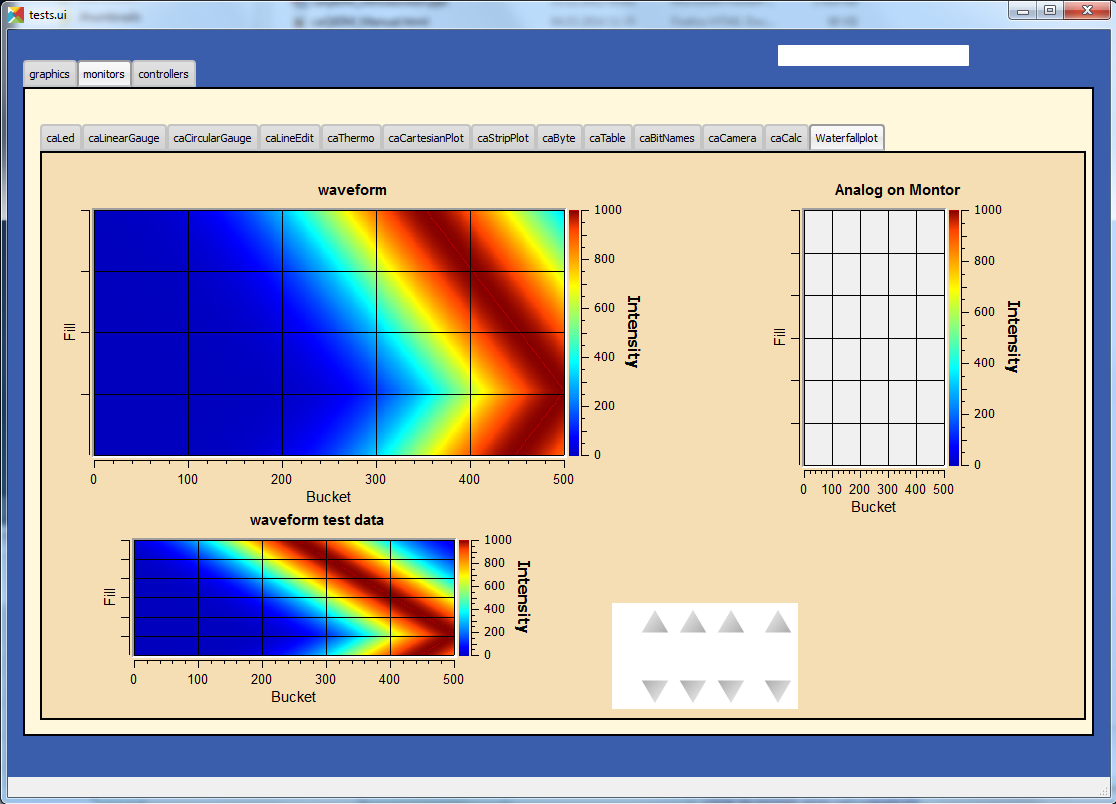
The following screen was created by using the file tests.ui. It contains all available epics related widgets of caQtDM.
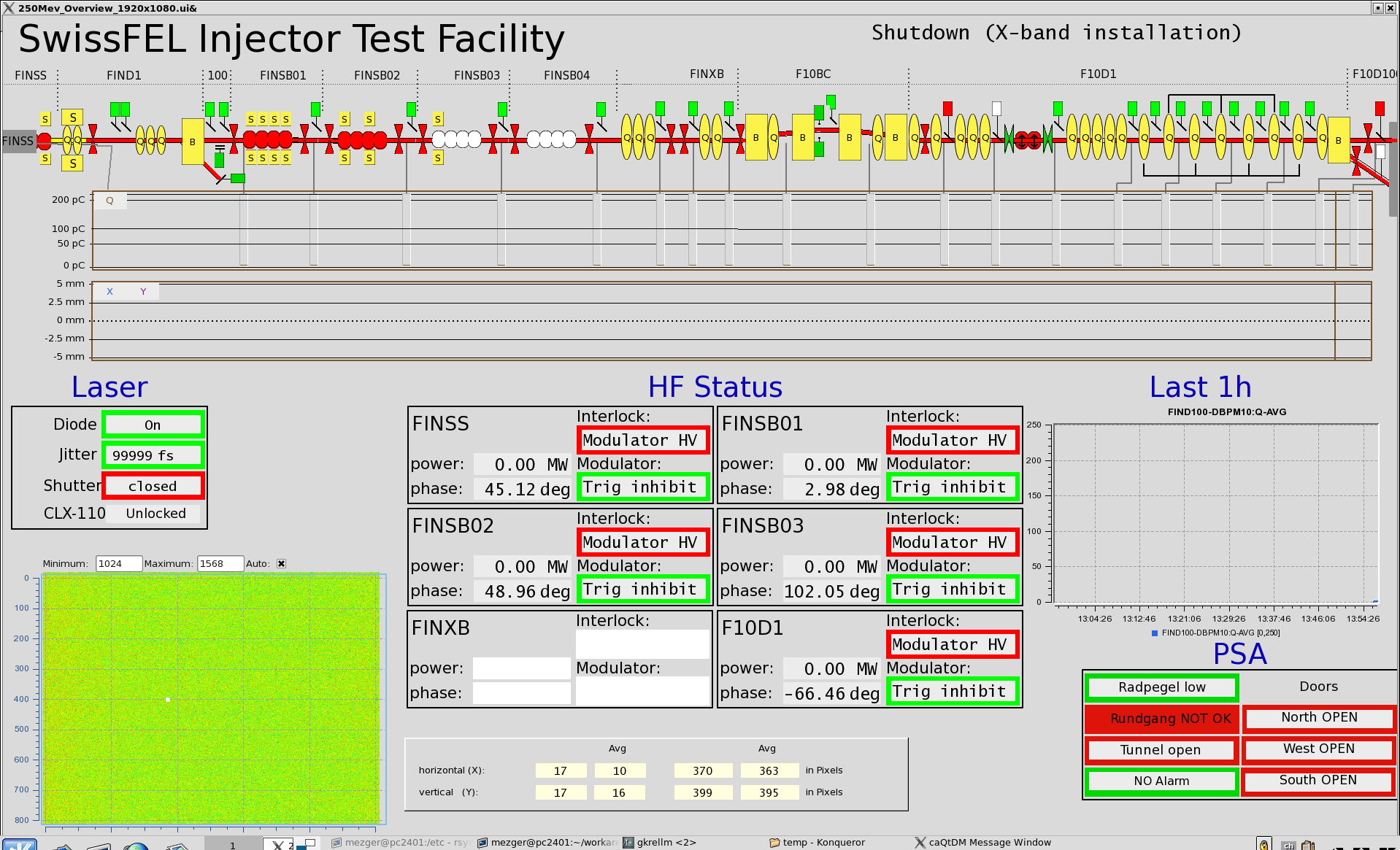
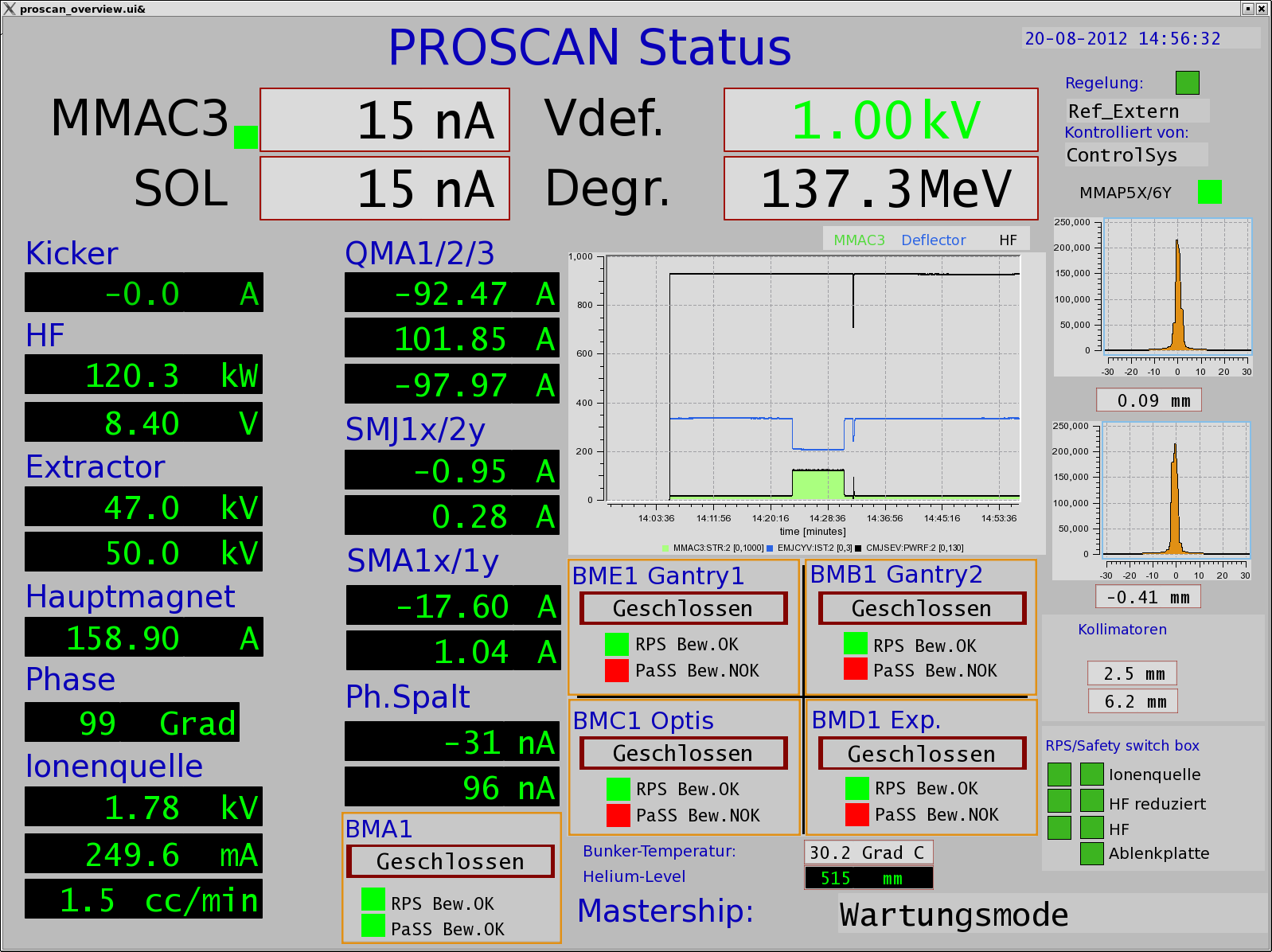
Some more examples of caQtDM displays (click to enlarge):
2. Downloads and Tracker
Version 4.4.0 (for higher versions goto github and clone the development path)
This distribution contains all the sources. Of course you will have to install/compile Qt,Qwt,SSL and ZMQ first on your platform.- caQtDM_4_4_0 (V4.4.0.tar.gz), sources and build scripts only
- caQtDM_4_4_0 (V4.4.0.zip), sources and build scripts only
- List of modifications for version 4.4.0
Installation Packages
The MS Windows and the Mac OS X distribution contain only binaries and you can immediately start to use it after installation.- For Windows:
- For Mac OS X : caqtdm_4_4_0.dmg
- For iOS (iPad+iPhone) caQtDM 4.4.0: caQtDM
- Special for Android caQtDM 4.2.5_ACM: caqtdm 4.2.5-ACM
| Download | ||
| caQtDM_4_4_0_x64.msi |
3. HowTo
Did you know that the core class of caQtDM can be used to write C++ applications in a quite easy way? You may design an user interface that can be used by the core class and you can introduce in your application then more data acquisition and intelligence. See the two examples given below:
probe scan: An application using caQtDM libraries
rf display: An application using caQtDM libraries
How to install and run caQtDM
4. Presentations
- Powerpoint presentation from the epics collaboration meeting at SLAC, spring 2012
- Poster presentation at ICALEPCS 2013: presentation poster
- Powerpoint presentation from the epics collaboration meeting in Paris, autumn 2014
- Powerpoint presentation from the epics collaboration meeting in Lund, spring 2016
- Powerpoint presentation at the APS (howto's), spring 2018
At APS they recorded a caQtDM Tutorial given by Jim Stevens and uploaded it to YouTube: https://www.youtube.com/watch?v=1vdSy0bsenI
5. List of Documented Modifications
4.2.0
- 4.2.0
- major changes in camera widget to support all possible epics data modes and camera modes
- rich text now also considered for fontscaling
- epics version number will now be printed in the message window
- added include definition for epics 3.15 and higher
- prevent too many messages when epics exceptions
- 4.1.8
- bsread support for 2D waveforms
- added ctrl+ and ctrl - to increase or decrease window size
- added a slot for executing the message button
- unresolved macros window implemented
- the problem of increasing open files solved
- added possibility to disconnect all channels in hidden tabs
- problem with autoscale and infinite values solved
- month number in date corrected
- soft variables were not always updating. eliminated test for update; soft variables will not be updated in hidden tab
- 4.1.7 # problem with cawavetable corrected # when Qt4.6 using qwt6.0 no support for date time axis, fallback to linear axis # problem introduced for cacalc, corrected in new release # added possibility to get info for objects when overlay widget has no monitors
- 4.1.6
- added to print date, time and filename
- added signals to cachoice, camessage so that setting of the index of a tabwidget will be possible
- changed all floats in archive plugins to doubles in order to get a better resolution of the time axis
- access security had a small bug when over a gateway
- command line option updatetype=direct added to set caQtDM in direct update mode
- camenu maske integriert, allows to make entries invisible
- cathermo marker has now variable size
- cursor shape did not change when on a cawidget and when access security changed
- regex expressions now possible when using a macro (ask helge brands)
- last index in array was not taken into account and scale was not updated for the waterfallplot
- optimization of archive plugins
- added the possibility to update QtabWidget tab texts with a macro
- changed padding for bigger fonts in carowcolmenu
- added the possibility to modify colors of cacalc
- resize storming of carowcolmenu solved
- cascriptbutton got a property to hide the checkbox
- QTextBrowser can now also display afile speicied with an url in the searchpath (see texts.ui)
- a hide/show slot has been added to the ca widgets
- the wmsignalpropagator got signals to propagate the resizing factor of a window. this can be used in order to correct animations with absolute pixel positions.
- when propagating through a signal a value to cacalc, this value is displayed. However was not propgated for further use. This has been corrected
- the colors of the caspinbox could be wrong due to a ack of proper initialisation, this has been corrected.
- very big doubles were not set correctly, this has been corrected.
- static visibility (while no channels) can be used now.
- handle double encoded url's in camimedisplay.
- added hide/show slot in all ca widgets (permits to hide and show a widget when propagating a signal from cacalc)
- when using waveforms from the archive, flashing of the cacartesianplot is suppressed when no data.
- added propagation of signal QRECT to parent, this allows to move a cainclude
- absolute positioning of items added to cainclude; abolute positions can also be channels that can move the positions.
- due to some changes to internal stylesheet, the carelateddisplay could not be hidden, this has been corrected
- x scale of cartesian plot can now also be used with a time scale (milliseconds from epoch)
- for visibilitycalc, when no channels specified, static calculation will be done at startup
- archive retrieval revisited, while crashing and http requests had to be canceled at exit.
- added check for when git not present
- added an environment variable CAQTD_TIMEOUT_HOURS to be used to quit caQtDM automatically, mouse event will reset the timeout.
- it is now possible to use caCalc as a vector (waveform) by specifying associated pv's. the soft variable can then be used to display a waveform
- 4.1.5
- possibility to add a frame around a caInclude
- in case of epics 3.15 added DBE_PROPERTY
- modified caQtDM.pri for macos
- modified caLineEdit and caLineDraw for displaying long long instead of long when double to integer representation
- caled circle will stay a circle when resizing with another aspect ration; border color can be customized
- add vumeter simulation to caThermo
- calineargauge made correct size when no scale (in order to make all sizes the same)
- for caRelatedDisplay one can now set the position for the called window
- for caThermo a problem solved in case of alarm colors (not always refreshed with right color) and transparency added for background
- for caThermo offset of 4 pixels modified in case of noscale
- added horizontal and vertical spacing properties to caInclude
- added possibility to modify position and size of a control object by the function %QRect in caCalc using 1 to 4 channels
- loading of files through internet now also over https
- again compatible with Qt4.6
- cachoice bug when using bit offset corrected
- legend added to cacartesianplot
- calineargauge and cacirculargauge modifier in indor to be smaller and changed font algorithme.
- added possibility to have another http address for archiveSF
- added test to indicate that waveforms are not supported by the archive plugins.
- archive plugins added
- epics4 plugin finalized for normative types, thanks to Marty Kraimer
- window management widget implemented (close window, ...)
- careplacemacro widget implemented; allows to redefine macros during runtime
- utilities designer plugin added for widgets not directly related to the control system
- X/Y waveforms implemented in camera view
- bsread plugin developed by Helge Brands finalized
- 4.1.3
- added for the cartesianplot resize of the fatdots plot
- softpv treatment was slowing done caQtDM and is corrected now
- camera has been more optimized for 16bit waveforms (the other types not yet, due to a lack of waveforms types)
- label and vertical label can gave a border now
- caChoice has now the possibility to display a row from the bottom to the top (rowInverse) and is optimized
- soft pv's without a name were not working, now automatically a name is generated
- in order to have cacalc's working correctly in includes, a macro can be used in order to individialize them
- zero values in cartesian plot are now replaced by the lowest non-zero value when logarithmic scale is used
- for infinite values, cartseian plot was taken unlimited resources for display, this should be corrected now
- slots are added to cagraphics for animation of these objects (tilt angle, span angle, arc, .. can be set now through signals
- caCamera will now zoom by default on the middle of the image and otherwise around the last clicked point
- autorepeat on canumeric has been take out on request of the users
- default timing of the timed update loop has now a lower internal rate, may still be changed by a json string
- .ftvl field of epics is now used to distingues signed and unsigned display in cawavetable
- in pep file you may add now the keyword -minwidth to an item in order to define the minimum width of it (default value=100). you can steer column width like that. also -comsize has been added for the comment to steer the fontsize.
- cachoice has been slightly modified in order to grow instead of shrink (for pep files this was an issue)
- searching of a pv for the infobox would find the pv independently of the associated plugin, giving therefore confusion
- 4.1.2
- caLineDemo has been renamed in caLineDraw and is now able to draw vertically
- cawavetable takes now information from channel.FTVL into account in order to define signed or unsigned data
- added CTRL+C to camultinestring for copying to clipboard
- now a widget can be added (see caLineDemo) without having to change caQtDM_lib. An interface has been defined in order to perform the datacuisition inside the widget class.
- caLineDemo widget is an example for a fast on QWidget based line monitor
- caMimeDisplay will now take macros into account
- fatDots implemented in cartesian plot
- more optimized image display
- tab order and focus considered
- trailing zeros of caspinbox and cawheelswitch suppressed
- toggle button for a soft pv was not working
- caQtDM uses now qwt6.1.1 in order to take advantage of multicore processing
- carowcolmenu performance enhancement
- options -url and -emptycache added
- it is now possible to pipe ui data to caQtDM
- reload management had to be changed due to some Qt memory management problem
- eliminated some memory leaks
- corrected wavetable string crash
- one can now define if the size of an included ui file will be size adjusted or not
- cabyte, cabytecontroller performance were bad and has to be be corrected
- camenu and catogglebutton color handling is now done by stylesheet and not with palette colors. This in order to prevent cascading stylesheets, that have precedence over palette colors, to interfere.
- default property for label set to transparent color
- window for included filenames shows now the number of times and average loadtime for loading.
- new options on command line available for caQtDM: -cs for specifiying default plugin to be used, -options for passing options (key, value pairs) to plugins
- use now the QStringlList editor in Designer for semicolumn separated strings
- mobile handling of config files slightly modified
- adjustment of fonts for android modified / apply button of caapplynumeric is now resizable
- resizing was perturbed by a resize forced by incoming channel data.
- the vertical label has now an alignment property
- cacartesianplot was not always well triggered when a trigger channel was specified, now corrected
- camimebutton added in order to start applications defined through the file extension
- cawavetable can now adapt its rows and columns automatically when zero is specified.
- an enum can be display in calineedit as number when enumeric is specified as format (otherwise as string in all cases)
- a multistring widget has been added to display waveforms with chars and strings (in case of chars a \n will make a new line)
- initialisation of the first stripplot values with nan instead of zero. Value zero was confusing.
- added the possibility to clear the messages through the file menu
- in case of -attach with a huge macro, the shared memory was designed too small. now 2 kBytes can be transferred
- camultilinestring has been implemented in order to mainly display char waveforms where carriage returns (ascii code 13) will produce a new line
- cameter was not updating its label for Qt5; this has been corrected
- some possible buffer overrun conditions corrected
- one can choose now the number of divisions for x on castripplot
- tooltip for properties are now present in psi patched version of Qt4.8.2 and for Qt5.6.0 and higher
- tooltip for caQtDM objects will integrate the tooltip given by the designer
- signal emit of cacalc has now also its integer and double value (this way you can for example switch the tabwidget pages with a cacalc that is updated by a soft/real channel)
- pep emulation has been updated by cosylab
- some slots have been added in order to link signals and slots in designer
- QStackedWidget will also optimize its io for visible/hidden tabs
- color handling for calineedit has been slightly changed in order to be able to get white on red in case of a major alarm (wanted for pep handling)
- cartesianplots have now a group property in order to be able to align the horizontal scale (vertical label rectangle gets same width)
- when a pep file and an ui file were displayed by caQtDM, some resize problems and a problem with capolyline was detected; is now solved
- cainclude can handle now multiple instances of the same file in column, row or rowcolumn mode and use for each instance another macro
- caQtDM has now a controlsystem plugin structure. CS can be added by writing a plugin (see demo plugin) that will automatically be loaded. By specifying the plugin in front
- of the pv name (i.e epics3://somepv) that plugin will then be used.
- fixed a small problem while writing a string to epics (could crash)
- the build files have been simplified
- edl2ui enhanced (by Lucas Carvalho)
- several warnings (mainly on mac osx) solved
- capolyline was not resizing correctly, this has been now corrected
- a string containing a semicolumn was only displayed up to the semicolumn, this is corrected now.
- cacamera and cascan2d got display of selected values and readback values with different representations and may therefore write values to the CS
- soft variable bug corrected (was not always found when writing)
- catextentry got input dialogs (filedialog in case of strings, otherwise simple dialog)
- catextentry will keep its cursor position after pressing return to set the value
- activ widgets were always brought in front. Now you can choose if you let the designer define the layer
- QTextBrowser can be used with macro substitution. The file that will be read in, will be watched for changes and will automatically be reloaded
- a vertical label has been implemented
- calinedit for DBF_CHAR was missing.
- infobox got epics description of channel
- some small bugs corrected in infobox
- some reingineering done
- cabytecontroller directions corrected
- we can now use a python function for calculations cacalc and visibility (see tests.ui)
- caQtDM will now also download from http when CAQTDM_URL_DISPLAY_PATH is defined
- When starting with the option -httpconfig you will get the configuration screen in order to use network files as in mobile apps.
- macros can now also be read when specifying -macrodefs filename
- caMessageButton can be disabled/enabled by a second channel
- configdialog for http configuration slightly changed
- Zai added some edl objects
- added cabytecontroller,for reading and setting individual bits
- camenu: prevented scrolling of menu with mouse scroll while it interferes with scrollareas
- changed default direction of caByte in parser.c in order to be compatible with MEDM
- softpv name can now contain a macro
- added calc string to info window
- severity of a char/string record was not considered and is corrected, Char waveforms longer as 1024 were not displayed in calineedit and is corrected.
- in edl2ui zais addons were integrated
- softpv's in include file enabled
- more colortables for caCamera, caScan2D, caWaterfallPlot
- caScan2D added
- added a clock allowing to display normal time or reception time of a process variable; alarm handling can be enabled to colorize the clock
- added a new dial
- problem with soft pv corrected
- QTextBrowser can be used with macros in order to dynamically load files for display thmen in this textbrowser
- modified the configdialog for ios and android
- prevent caQtDM from crashing when maxvalue and minvalue have the same value.
- for some images, the last row was missing and is corrected now
- added the possibility to have a custom colormap for cameras
- many changes involving android
- many changes for iphone, epics can now also reconnect after being suspended
- calineedit a bit more performant
- on ipad/iphone files were always downloaded, this has been optimized
- graphic plugings were missing on osx/ios, has been corrected
- prevented crash on exit
- cacamera can be displayed without toolbuttons and will be zoomed in ints container
- cascriptbutton has now the possibility of a macro in its parameter
- truncate value display in calineedit is now implemented
- caStripPlot was eating the CPU and has been optimized; refreshrate (low, medium, high) has been introduced, so that it can be adjusted by the user
- some crash conditions eliminated
- a bug for catextentry writing doubles that shortly appeared in this version, is fixed now.
- pixmaps on buttons get rescaled now
- modified cawavetable to display as matrix with a finite number of elements; elements can be modified and representation choosen
- caWaveTable can display now values as decimal, string, hex and octal
- on ipad the slider click and tapandhold interfered, this has been solved
- on ipad the autorepeat option of the wheelswitch has been disabled while interfering with tapandhold
- on ipad it is possible now to give multiple ip addresses in the EPICS_CA_ADDR_LIST separated by blancs
- eliminated some warnings
- test for null pointers added in case of absence of channels
- resizing of caTable and caWaveTable has been changed
- added limits and precision dialogs for several objects
- in case of tabbed widgets, monitoring of hidden pages is now suspended in order to release network traffic and cpu load
- build of product is now optimized with dependencies (thanks H.Brands)
- modified dialogs for virtual keyboard in IOS
- drvh, drvl changed back to hopr, lopr for caslider and canumeric
- slider will not move when no write access
- adl2ui will not expand label width per default, when required, then use the option expandtext
- dialogs have been modified for better display on ios
- cacalc has now a scalable font
- new logo
- more changes for ios
- castripplot has been modified so that resizing does not clear the curves
- epics timestamp introduced for info box
- modified catogglebutton in order to be able to resize its label
- greek micro replaced by u when macos or ios
- when rescaling castripplot, figure will be cleared
- added cawavetable in order to display a waveform numerically (maximum items = 300)
- adapted source code in order to run on ios (ipad)
- cachoice crashed when index was higher than the number of ENUMS, fixed
- castripplot changed in order to get also auto scaling
- the title of the display can now be set in the window caption by defining the dynamic property "Title" for the mainwindow. when using a macro definition, this will be expanded.
- when writing a double, float was used so that the precision was lost, corrected
- related display modified for up to 16 items
- changed names for designer groups to include PSI Name
- changed caToggleButton and caLed behaviour
- changed caSlider and caThermo to be compilable with the standard version of qwt6.1 when using qt5.2
- modified caQtDM_Lib to be callable from the software of the Australian lightsource
- fixed a bug in the scrollbar behaviour of the camera widget
- in waterfall plot the demo plot was not erased at initialization with real data, corrected
- added a property to the waterfall plot in order to define the maximum number of points treated in the waveform
- due to the change 3.7.4 for reload, the popup of an existing window was not working correctly
- cagraphic lost its linecolor after no connection
- calineedit was not showing alarm colors in alarm_default mode
- improved performance for cartesian and waterfall plot; very long arrays can be displayed
- zoom in cartesian plot was not working well for small values and has been corrected
- added properties to calineedit in order to be able to make a framed border
- cagraphic lost its linecolor after no connection
- calineedit was not showing alarm colors in alarm_default mode
- improved performance for cartesian and waterfall plot; very long arrays can be displayed
- zoom in cartesian plot was not working well for small values and has been corrected
- added properties to calineedit in order to be able to make a framed border
- a spinbox has been integrated in order to be smaller than the wheelswitch. for the spinbox the digit has to be activated by clicking in order to change it.
- strings in calineedit were trimmed; took that out
- selection in catable can be rows or coluns now, catable can execute a specified script with the associated pv
- eliminated sending message in camessage with right button of mouse.
- an empty char waveform was not clearing the calineedit: corrected
- enums with empty strings were not displaying correctly in calineedit
- when reloading a .prc file, size of display was not minimized
- default back and foreground colors can be set now for calineedit/catextentry in ui-file stylesheet of mainwindow or in stylesheet.qss
- negative precision was leading to an unexpected behaviour, calineedit will use the precision and switch to exponential display
- spacebar press has been suppressed for camessagebutton, cashellcommand, carelateddisplay, carowcolmenu, cachoice
- changed for caslider and canumeric the limits for channel to DRVL and DRVH
- added to formread in prc file command and comlab modifiers
- cartseian plot and stripplot can have a logarithmic scale now
- suppressed slidervaluecallback when setting limits from hopr, lopr
- added a first attempt of a waterfall plot for waveforms
- corrected for cameras, position calculated when zooming to small images
- in case of reload, data display is now stopped until all displays are loaded again
- camera images can now be zoomed and scrolled
- reset zoom for cartesian plot did not reset correctly in case of channel limits
- added zoom mechanism for cartesian plot
- added update mechanism choice in main menu in order to switch to direct monitoring or timed monitoring
- starting performance optimized for relateddisplay, cachoice, camenu
- splashscreen added for loading includes (in some cases loading time can be significant)
- by using CAQTDM_EXEC_LIST as environment variable (as in MEDM with the same syntax), menu items can be added to the context menus
- for cathermo in parser the look was not see as property and cathermo itsself was initializing itsself per default wrong
- bug corrected when unfinished enum definition
- slider was writing to epics on first call, now it does not
- capolyline now does not extend its lines when linesize > 1 is used, reproducing the behaviour of MEDM
- cathermo and caslider resize handle and labels according to the size, foreground and background are working correctly now
- however with qwt6.1.0 in qwt_slider the routine scaleDraw(); must be set protected instead of private as was in qwt6.0
- caQtDM gives information now about number of monitors/s, number of displays/s and highest monitor
- adapted caslider for qwt6.1
- corrected a bug for cagauge with alarms no
- use control key for amplifying 10x the increment
- caslider has now a menu to change its increment, in designer increment can be specified to
- caslider moves also on left mouse click and an wheel scroll; when it has the focus, up and down keys can be used (when focus outline red gets drawn)
- gauges have now following properties: alarmLimits : Channel_Alarms, User_Alarms, None
- displayLimits : Channel_Limits, User_Limits
- adl2ui has been corrected for these properties
- enhanced performance for camera widget
- package can also be build with Qt4.6 and qwt6.0, necessary for SL6 (cacartesianplot, cadoubletabwidget and plugins slightly modified)
- epics enums and strings modified for count > 1
- camera stuff modified
- added mutex to synchronize data and display
- font bug in catable solved
- found a datarace in castripplot, corrected
- cacamera displays intensity at x, y
- cacamera context menu for grey / spectrum and zoom
- caStripplot has been revisited
- caCamera uses now concurrent mode for calculations
- mainwindow and messagewindow have been merged
- caTable gets now the correct font after resizing when values update
- caStripPlot has been corrected for incorrect time behaviour.
- in menu you have the possibility to raise the main and message windows
- when requesting a display that was already started, it did not popup but made a new instance. this has been corrected
- this was working before, but by some modifications was not correct any more
- The build mechanism for linux and windows should do on most platforms, see caQtDM_README
- caQtDM build for qt4.8 with qwt6.0 and for qt5.1 with qwt6.1
- caled can use now the severity to colorize
- cathermo was inadvertently using nodeco mode when mode was used
- cacirculargauge will draw a white scale when not connected and bug corrected
- for enums without enum string write just the value in calineedit
- The main characteristic of this version is that you can resize the caQtDM synoptic display windows without using Qt layouts. You can build a display normally and everything will be resized when you resize the window.
- In order to make the resizing correctly, you should specify for the fontscalemode of caLabel and caLineEdit the parameter "WidthAndHeight".
- When you convert MEDM displays with the utility adl2ui, this is done automatically.
- When you do not want a window to be resized, you can specify -noResize on the command line.
- Another enhancement existing since version 2.8 is the fact that you can hook a digit of the wheelswitch to the keyboard in order to modify it with the up and down keys.
- All the changes have been documented in qtdefs.pri
- Scales of Stripplot can now be changed during runtime. The caQtDM application normally limits the update rate of monitors to 5 Hz,
- however now a JSON string can be written behind the channel name.
- An example is given in the presentation "introduction to caQtDM".
- Color mode for calabel is now working (was forgotten). Also an icon is presented on the window bars.
- A Windows distribution package allowing to work immediately with the designer and caQtDM has been build and can be downloaded here
- (this package does not contain any sources, merely executables, work done by H.Brands at PSI).
- Timebase of Stripplot was wrong and has been corrected. Some other compiler warnings have been eliminated and the building process was slightly modified.
- When using correctly the layout possibilities offered by Qt, one can resize a window (you will find an example in work/caQtDM/parser/proscanFiles/phaseslitsnew.ui).
- Up to now when using "includes" only a placeholder could be seen in the designer. Now the included ui file is displayed inside the designer.
- For polylines and polygones, a graphical editor is integrated into the designer. One can create segments by pressing the left mouse button when moving the
- mouse and one can delete the last created segment by pressing the right mouse button.
- The graphical entities (rectangles, circles, ellipses, lines, arrows, triangles) can be rotated by specifying a tilt angle.
- The major changes in this version are changes for stability (in the previous version sometimes crashes occurred) and the introduction
- of soft pv's. A variable can be defined, calculated and used as a normal pv.
- All the features of medm used for the cartesian plots are implemented now. The cartesian plot background can be transparent so that a camera image can be
- underlaid. The limits of the x and y axes can be changed by specifiying pv's instead of values when using channel limits. The stripplot widget has been
- modified while the behaviour was not quite correct. The message button and textentry were not working well and have been corrected. Labels can be transparent too.
- A camera widget has been introduced. At PSI we can now display are usual cameras bw and color. You can easily modify the code to treat other formats
- of camera waveforms.
- caQtDM gives the number of connected and unconnected channels, furthermore a list of unconnected channels with their file location can be shown.
- caQtDM is now protected against ui description file syntax errors;
- caQtDM supports the command line parameters -attach -noMsg -display -macro -x -noStyles -dg. -x has no effect but suppresses the error message when
- keeping the medm command line parameters.
- caQtDM runs in native mode on linux as well as on microsoft windows.
new in 4.1.0
new in 4.0.3
new in 4.0.2
new in 4.0
new in 3.9.5
new in 3.9.4
new in 3.9.3
new in 3.9.1
new in 3.8.9
new in 3.8.7
new in 3.8.5
new in 3.8.4
new in 3.8.1
new in 3.7.8
new in 3.7.7
new in 3.7.6
new in 3.7.3
new in 3.7.0
new in 3.6.4
new in 3.6.2
new in 3.6.1 since 3.5.2
new in 3.5.2
new in 3.5.1
new in 3.5.0
new in 3.4.7
new in 3.4.6
new in 3.4.5
new in 3.4.4
new in 3.4.3
new in 3.4.2
new in 3.4.1
new in 3.4.0
new in 3.3.1
new in 3.3.0
new in 3.2.2
new in 3.2.1
new in 3.2.0
new in 3.1.1
new in 2.8 - 2.5
new in 2.5
new in 2.3
new in 2.1
new in 2.0
6. Correspondence list between MEDM, EDM, caQtDM
(has to be completed)by courtesy of Zai Wang from synchrotron.org.au
| Graphics | Graphics | Graphics | Description |
| MEDM widget (from Doc) | EDM widget (from Doc) | CaQtDM | |
| Line | caGraphics | ||
| Rectangle | Rectangle | caGraphics | |
| Oval | Circle | caGraphics | |
| Arc | Arc | caGraphics | |
| Text | Static Text | caLabel | |
| Image | caImage | ||
| GIF Image | caImage | ||
| PNG Image | caImage | ||
| HTML | ? Qt understands html text | ||
| Dynamic Symbols | ? caImage | ||
| Polygon | caPolyLine | ||
| Polyline | Lines | caPolyLine | |
| Monitors | Monitors | Monitors | |
| MEDM widget (from Doc) | EDM widget (from Doc) | CaQtDM | |
| Meter Monitor | Meter | caCircularGauge | |
| Bar | Bar | caThermo | |
| Text | Text Monitor | caLineEdit | |
| Byte Monitor | caByte | ||
| Byte | ? | ||
| Cartesian Plot | caCartesianPlot | ||
| Strip Chart | caStripPlot | ||
| X-Y Graph | caCartesianPlot or caStripPlot | ||
| Message Box | ? | ||
| Symbols | caImage? | ||
| Scale Monitor | caThermo | ||
| Controls | Controls | Controls | Description |
| MEDM widget (from Doc) | EDM widget (from Doc) | CaQtDM | |
| Entry Text | Text | caTextEntry | |
| Slider | Slider | caSlider | |
| Menu | Menu Button | caMenu | |
| Choice Button | Choice Button | caChoice | |
| Message Button | Message Button | caMessageButton | |
| Related Display | Related Display | caRelatedDisplay | |
| Shell Command | Shell Command | caShellCommand | |
| Menu Mux (multiplexor) | ? | ||
| Multiplexor | ? | ||
| Button | ? | ||
| Motif Slider | caSlider | ||
| Up/Down Button | ? | ||
| Exit Button | ? | ||
| Radio Box | caChoice | ||
| Wheel Switch | caNumeric | ||
| Composite | Use caFrame and caInclude | ||
Author: A.C.Mezger Phone: +41 56 310 3406 Email: anton.mezger@psi.ch Updated: 06.01.2015